Use SFTP or SCP to access your SDA account at IU
Before storing data on any of Indiana University's research computing or storage systems, make sure you understand the information in Types of sensitive institutional data appropriate for UITS Research Technologies services.
Make sure you do not include sensitive institutional data as part of a file's filename or pathname.
To access your Scholarly Data Archive (SDA) account via SFTP or SCP, use the hostname sftp.sdarchive.iu.edu.
Two-factor authentication is required. Before you begin, make sure your account is enrolled with Duo; see Get started with Two-Step Login (Duo) at IU. For group accounts, see Use Two-Step Login (Duo) with a group account.
If you are prompted repeatedly to authenticate with Duo, you may want to set your SFTP client's preferences to allow only one connection at a time. If file downloads fail, you may want to set timeout settings to at least 120 seconds.
If you want to use a graphical client, UITS recommends downloading and installing one of the following free, open source clients:
- macOS: Cyberduck
If you do not want to be prompted to authenticate with Duo for every transfer:
- In Cyberduck, select .
- Under "Transfers", use the "Transfer Files" drop-down to select .
The Fetch client does not require you to change this setting.
- Windows: WinSCP
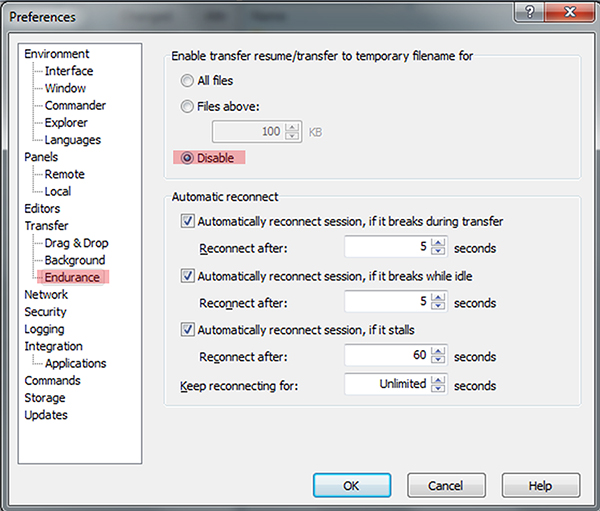
To use WinSCP with your SDA account, you must disable the Endurance feature, which is not compatible with newer versions of HPSS:
- In WinSCP, navigate to . In the left navigation of the "Preferences" window, select .
- Under "Enable transfer resume/transfer to temporary filename for", select .
- Click .
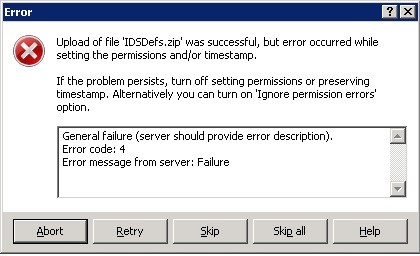
If Endurance is not disabled, WinSCP will display an error message beginning with "Upload of file '[filename]' was successful, but error occurred while setting the permissions and/or timestamp."
When you connect to your SDA account, the default directory is your home directory. The path to your home directory depends on the first two characters of your username (for example, /hpss/o/w/owkenobi or /hpss/d/a/darvader). However, most SFTP clients will display your home directory with the class of service prepended (for example,
/cos1/hpss/l/c/lcalriss).
Files you create in your home directory are assigned a default class of service (/cos1). If your files are too large for the default class of service, you can switch to another one. To do so, change to another directory by replacing the /cos1 prefix; for example:
- To change to class of service 2, prepend
/cos2to your current directory (for example,/cos2/hpss/p/a/pamidala). - To change to class of service 3, prepend
/cos3to your current directory (for example,/cos3/hpss/j/a/jarbinks).
The contents of the directory will appear the same in either case, but writing files to the different directories creates files in the selected class of service. For more, see Use classes of service on the Scholarly Data Archive at IU.
If you frequently use different classes of service, you can create links in your home directory to make changing directories easier. For example, in SFTP, you can do the following (replace the example username, home directory, and filename with your own):
sftp dartmaul@sftp.sdarchive.iu.edusftp>symlink /cos3/hpss/d/a/dartmaul bigsftp>cd bigsftp>put my_big_file.zip
Although you must use SFTP to create the link, you can use it with SCP; for example:
scp *.zip dartmaul@sftp.sdarchive.iu.edu:bigIf you have questions about accessing your SDA data using SFTP or SCP, or need help, email the UITS Research Storage team (store-admin@iu.edu). For information about other methods for accessing the SDA, see Access the SDA at IU.
Related documents
This is document avax in the Knowledge Base.
Last modified on 2023-11-16 16:18:14.