ARCHIVED: Oncourse Matrices: Overview
What it does
A matrix is a framework for guiding students (or another group of users) through the process of creating a learning or assessment portfolio. In a matrix, portfolio assignments are represented as cells organized into rows and columns with descriptive titles. Clicking a cell opens a web page with instructions, a button for uploading or attaching files, and links to forms for writing reflections, feedback, and evaluations. Some cells may also contain one or more customized data entry forms.
Following the guidance in each cell, students add materials (e.g., documents, videos, images) from Resources to document their learning or achievement. They may also be prompted to write a reflection. Before submitting the cell for evaluation, students can receive formative feedback from designated reviewers and from individuals they invite to comment on their work. After the cell is submitted for formal evaluation, a designated evaluator (or group of evaluators) reviews the contents of the cell and completes an evaluation form.
Key concepts
Cell linking: Some matrix cells may be linked to cells in the same matrix or in other matrices. When cells are linked to other cells, the link information appears at the bottom of the page.
Assignment linking: You can link assignments in the Assignments tool to matrix cells; see ARCHIVED: Linking an assignment to a portfolio matrix cell.
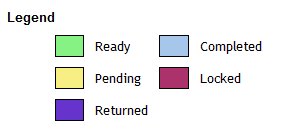
Cell status: Matrix cells are color-coded to indicate their status (see legend below). Green indicates that the cell is "Ready" to accept input from students. When a cell is submitted for evaluation, it turns yellow, which signifies the "Pending" status. Pending cells cannot be edited by students. After the cell has been evaluated, the evaluator will change the status to "Completed", or to "Returned" in order to request changes or additions from the student. Cells can also be "Locked" to prevent students from adding content to them until a previous cell has been completed.
Things to consider
-
Note: Matrices are highly customizable. The number of rows and columns, their titles, and the contents of each cell can vary widely from one matrix to the next. The instructions presented in this and other help documents are generalized and may not exactly reflect the contents and appearance of the matrix with which you are working.
-
Note: If you are planning to use the Reports tool with any of the evaluation form rating reports, the evaluation forms in the matrix must comply with ARCHIVED: IU's evaluation form standards.
Help documentation
For help documentation about the Matrices tool, see ARCHIVED: Matrices.
This is document avxq in the Knowledge Base.
Last modified on 2018-01-18 15:58:29.