Indiana University
University Information Technology Services
  
What are archived documents?
Login>>
Login

Login is for authorized groups (e.g., UITS, OVPIT, and TCC) that need access to specialized Knowledge Base documents. Otherwise, simply use the Knowledge Base without logging in.

Close

At IU, what options exist for student response devices?

From 2005 through 2009, Indiana University designated eInstruction as the student response (clicker) system for formal university-wide support. In order to take advantage of new technologies, including integration with Oncourse CL and mobile devices, IU has entered into an agreement with Turning Technologies beginning in the fall of 2009. Instructors may use whatever products they choose in their classes, but formal integration into Oncourse CL will be exclusively with Turning Technologies.

The contract with eInstruction, which provided a reduced student enrollment/registration fee, expired on August 31, 2009. The eInstruction/CPS software will remain on the classroom computers during the 2009-2010 school year for instructors who wish to continue using eInstruction. During this transition period, the following options will be available.

All three Turning Technologies options can work in the same classroom. Instructors may allow all three or may require (or disallow) a specific option. There are no registration fees. Students in different classes may share devices.

For multiple classes requiring Turning Technologies clickers, you may be able to use the same device; see the table below. eInstruction clickers are not compatible with Turning Technologies clickers.


  Turning Technologies eInstruction
  ResponseCard RF ResponseCard RF LCD ResponseCard XR ResponseWare Web App CPS RF
 
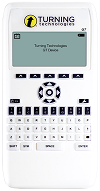
Photo of ResponseCard RF
Photo of ResponseCard RF LCD
Photo of ResponseCard XR (newer models)

Note: Older models are blue.

Photo of ResponseWare Web App on a mobile device
Photo of CPS RF
Features 12 key (1[A] - 10[J]) response options

Answer confirmation via a three-second green light signal

Vibrating accessibility model available
Same as ResponseCard RF, with addition of a small LCD screen to display the response selected, channel setting, and battery life Alphanumeric, multi-digit, decimal point, and positive/negative entry

Answer choice and response confirmation

Most similar to eInstruction CPS RF
For web browsers, iPhone, iPod Touch, BlackBerry

Alphanumeric, multiple choice, multiple response, essay
Alphanumeric, multi-digit, decimal point, and positive/negative entry

Answer choice and response confirmation

Most similar to ResponseCard XR
Compatibility Cannot be used in classes requiring the XR model Cannot be used in classes requiring the XR model Can be used in any class requiring a Turning Technologies clicker Can be used in any class requiring a Turning Technologies clicker if instructor permits use of laptops/mobile devices in class Not compatible with other devices
Integration with Oncourse CL Yes Yes Yes Yes No
Enrollment code None None None None (1- or 4-year license) Online: $13/semester with $39 cap (higher at bookstore)
IU Bookstore price $37.35 (lifetime) Information not yet available $53.53 (lifetime) $21.35 (1 year)
$42.65 (4 years)
$24
With enrollment codes:
$50 (1 year)
$59 (lifetime)
IU online price* $28 plus shipping $32 plus shipping $40 plus shipping $16 (1 year)
$32 (4 years)
N/A

*In order to receive the online price, IU students should log into this page with a Network ID to obtain the appropriate campus code, and from there proceed to the Turning Technologies online store. IU departments, faculty, or staff who want to make a purchase should contact their local purchasing office.

Note: Students or departments can get a $7 credit on a Turning Technologies clicker when turning in a competitor's clicker at the IU Bookstore. Additionally, students can get an $8 credit when trading in a ResponseCard RF for a ResponseCard XR.

If you are an instructor and would like more information about using student response systems in your classes, contact your campus teaching and learning center.

This is document ayps in domain all.
Last modified on November 05, 2009.

Comments/Questions/Corrections

Use this form to offer suggestions, corrections, and additions to the Knowledge Base. We welcome your input!

If you are affiliated with Indiana University and would like assistance with a specific computing problem, please use the Ask a Consultant form, or contact your campus Support Center.

Contact Information

Note: We will reply to your comment at this address. If your message concerns a problem receiving email, please enter an alternate email address.