ARCHIVED: In Outlook Web App (OWA), what are the "Premium" and "Light" interfaces?
Outlook Web App (OWA) provides two distinctly different interfaces, Premium or Light, depending on the version number of the browser you use to access it.
On this page:
- Premium interface
- Requirements for Premium interface
- Light interface
- Requirements for Light interface
- Features missing in Light interface
Premium interface
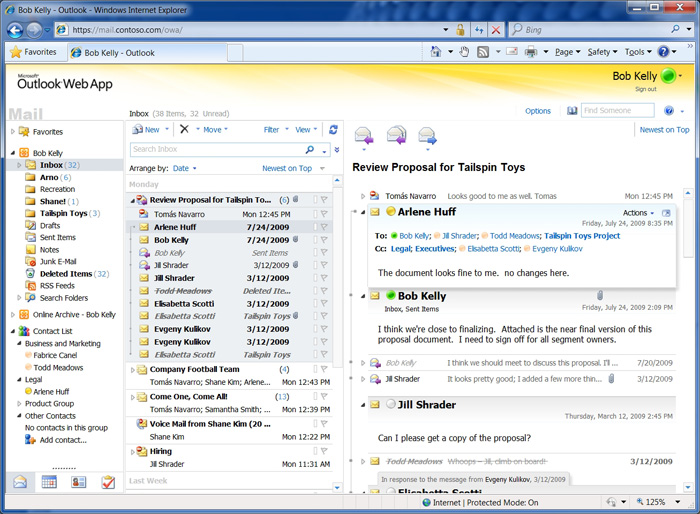
Screenshot of the OWA Premium interface
The Premium interface comes closest to replicating the actual Microsoft Office Outlook experience, with some right-click functionality and access to the full feature set.
Requirements for the Premium interface
You receive the Premium interface when you are using Internet Explorer 7 and above, Firefox 3 and above, Safari 3 on a Mac, and Google Chrome 5 and above.
Light interface
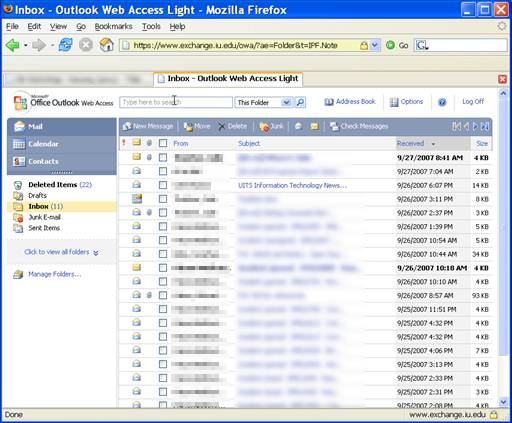
Screenshot of the OWA Light interface
Requirements for the Light interface
You receive the Light interface when you are not using one of the browsers or browser versions listed in the premium interface section above, or you have enabled the "Blind and low vision experience" option in OWA.
Features missing in Light interface
The following features of OWA Premium are not present in Light:
- Tasks module
- Task-specific properties: Only the text of task items can be read through OWA Light
- Reminders
- HTML composing of messages: OWA Light allows only plain text textboxes with no editing or formatting options
- Flags and Categories
- Monthly or weekly view in Calendar: OWA Light shows the daily view only
- Free/Busy grid in Appointment/Meeting Scheduling Assistant: OWA Light displays only "Suggested Times"x
- Spell Check
- Conversation View
- Account Storage information
- Recover Deleted Items
- Add/edit distribution lists
- Public Folder access
- S/MIME features
- Add/edit rules
The information above is taken from Microsoft Outlook Help concerning supported e-mail programs and features and Exchange 2010: OWA versus OWA Light.
This is document avsg in the Knowledge Base.
Last modified on 2018-01-18 15:32:59.